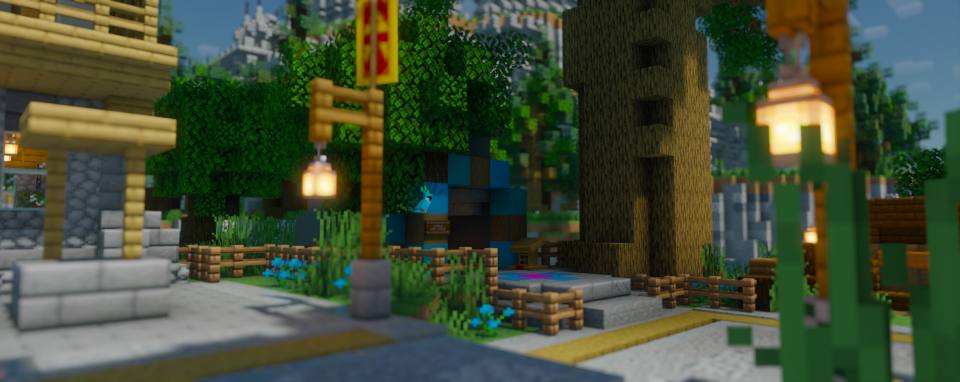
Shader Pack // by espen96
Bloop Shaders
A performance-first shader pack featuring volumetric lighting and extensive hardware scalability
- Latest
- Minecraft 26.2
- Updated
- Jul 12, 2026
- Style
- Semi-Realistic
Overview
Bloop Shaders focus on providing a versatile visual experience that prioritizes frame stability without sacrificing modern graphical features. Developed by espen96, this pack is built to scale across a massive range of hardware, making it a viable option for players on integrated graphics as well as those with high-end dedicated GPUs. It manages to balance advanced rendering techniques with a lightweight overhead, filling a specific niche for users who find many popular packs too demanding for sustained survival gameplay.
Technical Features and Scalability
Bloop Shaders 26.2 what sets this pack apart is its highly modular approach to fidelity. It utilizes efficient floodfill lighting and custom tonemapping to provide a clean, cohesive look across different biomes. The inclusion of volumetric light and mist adds significant depth to the atmosphere, while support for materials through LabPBR compatibility allows for realistic surface interactions like POM and Material SSR. It creates a semi-realistic shaders environment where light interacts naturally with the terrain, yet the overall aesthetic remains grounded in the classic blocky charm of the game.
Shadows are a highlight here, featuring both simple and advanced filtering options that work in tandem with contact shadows for added groundedness. The pack also boasts integration with Distant Horizons, allowing for shadow rendering even at extreme draw distances, which is a rare find in many performance-oriented projects. For those interested in technical polish, the implementation of TAA with anti-ghosting ensures that moving entities remain sharp, even during high-motion scenarios or fast-paced exploration.
From a performance perspective, the presets range from a bare-bones Lowest setting to an Ultra profile. The lower tiers are capable of maintaining playable speeds on hardware where established packs like Bliss or complementary-reimagined-shaders">Complementary Reimagined might struggle. While the high-end presets introduce heavy features like volumetric clouds and depth of field, the efficiency of the core code keeps the experience remarkably smooth. Compatible with both Iris and OptiFine across modern Minecraft versions, this pack serves as an excellent daily driver. It is particularly well-suited for survival players who want a consistent look that supports modded blocks and physics effects without the stuttering typically associated with high-fidelity shader packs.
Installation
Install Bloop Shaders as a semi-realistic shader pack for Minecraft 26.2 using Iris or Optifine.
- 01Install Iris or Optifine for Minecraft 26.2 and launch the game once.
- 02Download the ZIP that matches Minecraft 26.2 from the versions below.
- 03In Minecraft go to Options → Video Settings → Shader Packs → Open Shaders Folder.
- 04Drop the .zip inside without extracting, click Bloop Shaders in the list, then press Done.
Downloads
All versions of Bloop Shaders