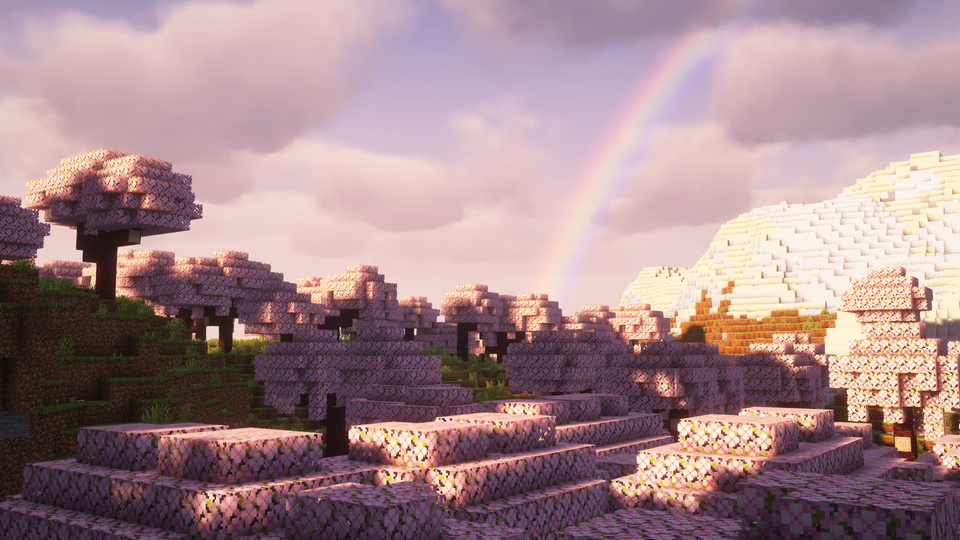
Shader Pack // by EminGT
Complementary Shaders
Unbound quality and realism for every block.
- Latest
- Minecraft 26.3
- Updated
- Sep 13, 2026
- Style
- Fantasy
Overview
Complementary Shaders 26.3 - Unbound serves as a sophisticated visual overhaul that prioritizes clarity, performance, and atmospheric depth. Originally stemming from the BSL lineage, this version has grown into a completely rewritten engine designed to provide a realistic aesthetic without losing the core identity of the game. It is part of a dual-style system where Unbound focuses on a more modern graphic fidelity, utilizing realistic lighting and shadow work that feels grounded. The project is highly regarded for its attention to detail, specifically regarding how light interacts with individual block types, ensuring that materials like ores, metals, and liquids have a distinct presence in the world.
Advanced Lighting and Material Detail
The lighting engine in this pack is remarkably clean, featuring soft global illumination and a balanced tone mapping system that avoids the over-saturation common in many high-end Minecraft shaders. One of the primary standout features is the implementation of custom effects for nearly every block in the game. This means that textures respond dynamically to light sources, with subtle reflections and emissive properties that make nighttime exploration and underground mining much more interesting. The skybox and water are equally refined, offering smooth gradients and realistic transparency that push the game toward a cinematic feel while maintaining playability.
While the Unbound style leans toward realistic shaders, it remains highly flexible. The developer, EminGT, has integrated a robust settings menu that allows users to toggle specific features like blocky versus rounded clouds or varying water transparency levels. In terms of performance, the pack is exceptionally well-optimized, offering profiles ranging from a lightweight "Potato" setting to an intensive "Ultra" mode. This makes it a viable choice for players with mid-range hardware who still want a premium visual experience.
Compatibility is a strong point for this pack, as it is fully functional with both Iris and OptiFine on Java Edition. It supports a vast range of game versions, making it a reliable choice for technical players on older versions or survivalists moving into the latest updates. Because it is built with gameplay visibility in mind, the fog and bloom never feel overwhelming, ensuring that your view remains clear during combat or complex builds. It is an excellent middle ground for creators who want high-quality screenshots and survival players who need consistent frame rates and visibility.
Installation
Install Complementary Shaders as a fantasy shader pack for Minecraft 26.3 using Iris or Optifine.
- 01Install Iris or Optifine for Minecraft 26.3 and launch the game once.
- 02Download the ZIP that matches Minecraft 26.3 from the versions below.
- 03In Minecraft go to Options → Video Settings → Shader Packs → Open Shaders Folder.
- 04Drop the .zip inside without extracting, click Complementary Shaders in the list, then press Done.
Downloads
All versions of Complementary Shaders