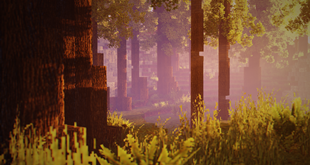
Shader Pack // by mlgimposter
RedHat Shaders
A versatile Chocapic13 edit featuring trailer-style lighting, cinematic effects, and broad version support
- Latest
- Minecraft 26.2
- Updated
- Jul 12, 2026
- Style
- Fantasy
Overview
RedHat Shaders 26.2 is a distinct modification and expansion of the classic Chocapic13 code base, offering a unique visual identity that balances fantasy aesthetics with modern technical features. Developed by mlgimposter, this pack shifts away from the stark hyper-realism of some high-end projects, favoring a vibrant, cinematic look that feels reminiscent of official game trailers. It utilizes many different Minecraft shaders techniques to achieve a dynamic world, from custom skyboxes to auto-exposure adjustments that respond to shifting light levels as you move between dense forests and open plains.
Lighting and Trailer-Style Reflections in RedHat Shaders
The core strength of this pack lies in its lighting engine. Users can expect advanced 3D godrays if their hardware allows, though the developer has thoughtfully included 2D alternatives for low-end machines. Shadows are soft but defined, and the underwater light absorption gives diving a much needed sense of depth. One of the most recognizable traits of these Semi-Realistic shaders is the way light interacts with all surfaces. There is a subtle reflective property applied globally, which creates a glossy, vibrant sheen that keeps the blocky world looking lively rather than flat. This is further enhanced by specific effects like grain, tilt-shift, and lens flares that give the game a high-production cinematic quality.
Movement and Environmental Variety in RedHat
Beyond static lighting, the pack introduces significant environmental movement. It goes beyond standard foliage waving to include subtle animations for lanterns and even options for the player's hand and camera, making world exploration feel more reactive. The color palette is noteworthy as it shifts throughout the day-night cycle, moving from warm golden tones to deep fantasy-inspired nights. Round celestial bodies for the sun and moon replace the default squares, complemented by stars and diverse cloud formations. It also supports PBR textures for players who want to add physical displacement and depth to their block textures.
Technical Compatibility and Hardware Requirements
RedHat Shaders is highly compatible, supporting almost every version of the game from 1.7.10 up to 1.21. It runs on both Iris and Optifine, making it accessible regardless of your preferred loader. While it supports Intel and AMD hardware, it is quite demanding on default settings. Users with integrated graphics or older GPUs like the GT 1030 should stick to light presets, while those with GTX 1660 Ti equivalents can push the heavier settings. It provides an excellent balance for players who enjoy capturing screenshots or cinematic videos without losing the essence of the classic voxel aesthetic.
Installation
Install RedHat Shaders as a fantasy shader pack for Minecraft 26.2 using Iris or Optifine.
- 01Install Iris or Optifine for Minecraft 26.2 and launch the game once.
- 02Download the ZIP that matches Minecraft 26.2 from the versions below.
- 03In Minecraft go to Options → Video Settings → Shader Packs → Open Shaders Folder.
- 04Drop the .zip inside without extracting, click RedHat Shaders in the list, then press Done.
Downloads
All versions of RedHat Shaders