Shader Pack // by Builderb0y
Builder's QOL Shaders
A performance-first shader pack that removes shadows to maximize framerates while beautifying water, sky, and lighting
- Latest
- Minecraft 26.2
- Updated
- Jul 12, 2026
- Style
- Vanilla-like
Overview
Builder's QOL Shaders and the Pursuit of Lightweight Visuals
Builder's QOL Shaders 26.2 is a distinct project in the world of Minecraft shaders specifically because it refuses to compromise on framerates. Unlike many high-end alternatives that chase cinematic realism, this pack focuses on functional improvements that enhance the vanilla experience without reinventing the game's core architecture. It was designed primarily as a quality-of-life tool for builders and survival players who need better visibility and cleaner aesthetics but lack the hardware to run heavy volumetric lighting or real-time shadows.
Maintaining High Performance Without Shadow Maps
The most significant technical decision made in Builder's QOL Shaders is the total omission of shadow mapping. By choosing not to render the world twice per frame to calculate shadows, the developer ensures that the performance impact remains negligible compared to standard packs. Instead, the focus shifts toward color correction, better transparency handling, and skybox improvements. This makes it an ideal choice for players looking for vanilla-like shaders that won't cause stuttering during complex builds or massive redstone projects. While the lack of shadows might seem like a drawback for some, it is actually the pack's greatest strength for low-end PC users.
Visual Refinements and Modded Dimension Support
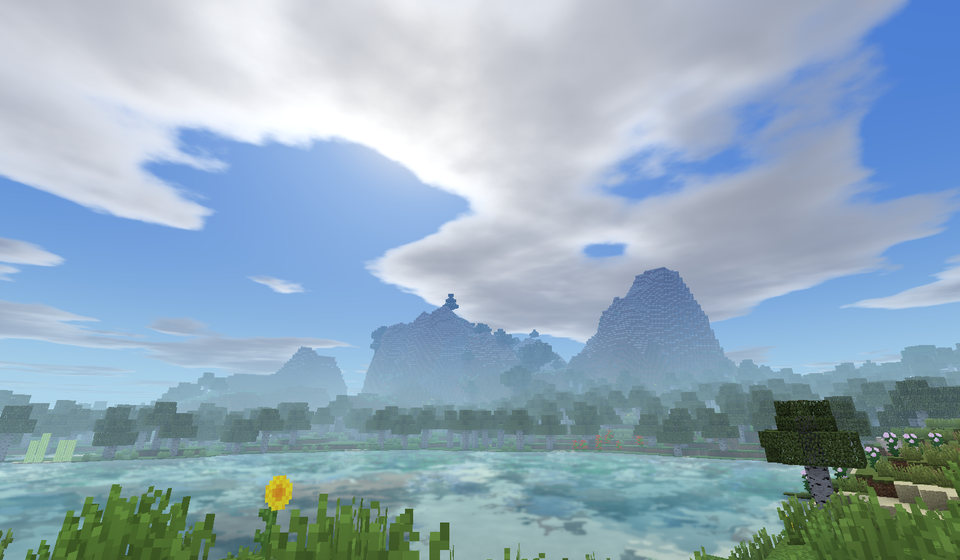
Despite its lightweight nature, the pack introduces several key visual upgrades that drastically improve the game's atmosphere. You will notice much cleaner water that avoids the muddy look of the default textures, along with a custom skybox that features wavy clouds and soft blur effects. The lighting feels more cohesive, especially when moving between different biomes or underground. One of the standout features is its long-standing history of supporting modded dimensions like the Twilight Forest, though this functionality depends on using the correct loader version. There are even specific "Main" and "Modded" editions available to handle the varying rendering pipelines used by different technical mods.
Practical Gameplay and Loader Compatibility
For modern players, the pack is fully compatible with Iris and Optifine on most Java Edition versions. While it is an older project and no longer receives active maintenance for bug fixes, its stability across a wide range of hardware makes it a reliable staple. It does struggle with certain translucent block layering issues, which is a known limitation of its simplified pipeline, but the trade-off is a buttery smooth experience. If you find your framerate dipping, disabling the fancy cloud settings or the blur effects can provide an extra boost. It remains a top-tier recommendation for anyone who values a clean, playable environment over graphical intensity.
Installation
Install Builder's QOL Shaders as a vanilla-like shader pack for Minecraft 26.2 using Iris or Optifine.
- 01Install Iris or Optifine for Minecraft 26.2 and launch the game once.
- 02Download the ZIP that matches Minecraft 26.2 from the versions below.
- 03In Minecraft go to Options → Video Settings → Shader Packs → Open Shaders Folder.
- 04Drop the .zip inside without extracting, click Builder's QOL Shaders in the list, then press Done.
Downloads
All versions of Builder's QOL Shaders